LAUNCH X431 Truck Diagnostic Graphical Interface Update
The LAUNCH X431 commercial vehicle software update includes more graphical interface options. Now, in addition to the topology map, you can also view the execution status of functions such as DPF Regeneration and Cylinder Deactivation graphically. Below, we will introduce the functions that support the graphical interface and the supported vehicle brands.
What are the advantages of a graphical user interface?
- Component-Level Visualization: Understand systems at a glance.
- Interactive Control & Real-time Feedback: Perform tests with a simple tap. See system response as you operate.
- Smarter & Faster Fault Isolation: Pinpoint issues with confidence. Reduce guesswork and improve accuracy.
Supports graphical interface features:
- Graphical DPF Regeneration
- Graphical ADBLUE
- Graphical Cylinder Deactivation
- Graphical Fuel Injector Coding
- Graphical Suspension Calibration
- Graphical Clutch Calibration
- Graphical APS (Compressed Air Power Supply)

*More graphical functions and supported brands are in development.
Q: Which X431 tools can use the graphical diagnostic function for commercial vehicles?
A: The PRO series, PRO3 series, and PAD series of X431 commercial vehicle diagnostic tools that have this function enabled. For example, X431 PAD V ELITE (with HD package), X431 PRO3S+ SmartLink HD.
The List Of Supported Brands And Functions
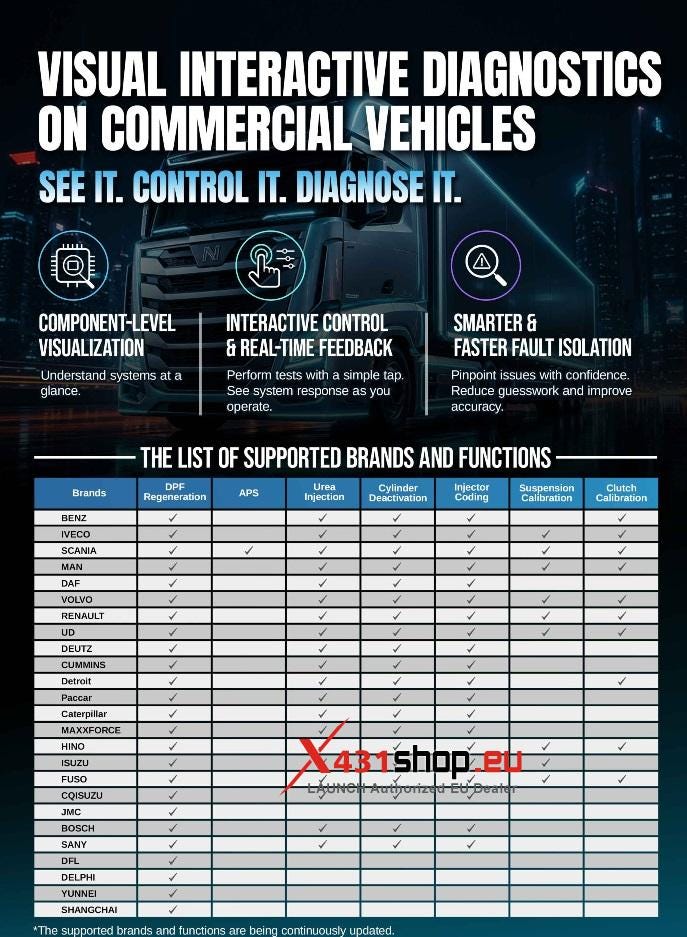
*The supported brands and functions are being continuously updated.


Comments
Post a Comment