LAUNCH X431 PAD: Online Programming Audi A6L Power Steering
The LAUNCH X431 PAD series, as LAUNCH’s flagship model, features online programming capabilities, allowing for 44 Power Steering Online Programming and Online Parametric Configuration on a 2013 Audi A6L. This article will explain how to perform these operations.
Note: LAUNCH X431 PRO 5 also has an Online Programming functions, but it only supports BMW & Mercedes-Benz vehicles. Other brands of vehicles, such as Audi vehicles, are not supported.
Function description: The 44 power steering system of Audi A6L has a DTC B200049 Faulty Control Module. You can try to perform the online programming and online parametric configuration functions first.
Supported products: LAUNCH X431 PAD V ELITE, X431 PAD VII, X431 PAD IX.
Fault Description: The yellow steering wheel MIL on the instrument panel turns on. The 44 power steering system has a DTC B200049 Faulty Control Module.

Procedure:
1. Connect to the vehicle and perform a quick scan on the X431 PAD. The DTC codes will be displayed on the screen. Next, select "Online Function" from this screen.

2. Choose [Online Programming].

3. Read the disclaimer carefully and confirm that the programming conditions are met. Click OK.

4. Choose [Automatic Mode].

5. Choose [44 Power Steering] and click [Click to Program].

6. Carefully compare the system information and the optional files. The first optional file is the closest to the system information, so we choose the first optional file and click OK.
Note: In this case, the vehicle system information is [4G0909144L-0010], and the file [XSWJKFC_FL_4G0909144L_0010_BP.xml], which appears first in the list, is the most suitable match.

7. Click OK to download the file. Click [DOWNLOAD]. Click OK when download is successful.

8. Flash is completed. Operate the vehicle according to the prompts. After the operations are completed, click OK.

9. Online programming is successfully performed. Click [Yes]. After the update, the VW dataset number or ECU data container number changes to [- — -]. It is necessary to perform the online parametric configuration function.
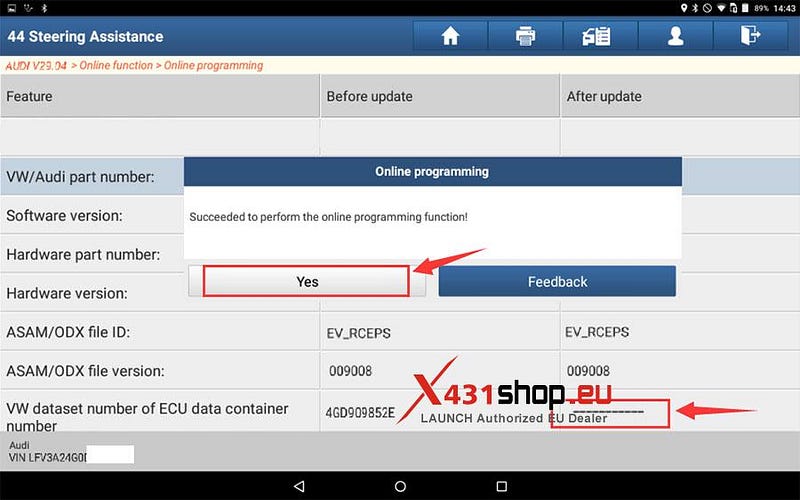
10. Click [Yes] to exit the online programming function and return to the [Online Function] menu.

11. Choose [Online Parametric Configuration].

12. Read the disclaimer carefully and click OK.

13. Choose [44 Power Steering] and click [Click to Reprogram].

14. Carefully compare the system information and the optional files. The first and second optional files are the closest to the system information. Choose the first optional file and click OK.

15. Flashing the ECU…

16. Operate the vehicle according to the prompts. After the operations are completed, click OK.

17. After the update, the VW dataset number or ECU data container number changes to 4GD909852E. The VW dataset version number changes to 0020.
Flashing the parametric configuration file is completed. Click [Yes].

18. Re-diagnose the vehicle and generate a diagnostic report. The 44 power steering system has no DTC.

19. The yellow steering wheel MIL on the instrument panel turns off.

OK, the Audi A6L 44 Power Steering Online Programming and Online Parametric Configuration process was successfully completed, and the vehicle has returned to normal operation.


Comments
Post a Comment